AI TOOL / #01242
Photo Stitching (PixPix)
Combine multiple images into a long image grid
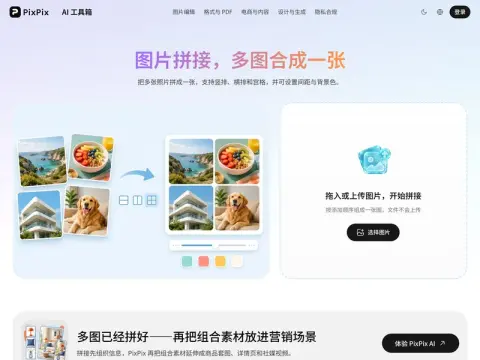
Introduction
Combine multiple images into one and output it as a JPG, with three layout options:
- Vertical typesetting— Read the long image and tutorial from top to bottom.
- Horizontal typesetting— Before-and-after comparison, with A/B options presented side by side
- grid—— When displaying multiple similar photos, they look neatest when they are all the same size.
Setting the spacing to 0 creates a seamless stitch, which works well for joining long screenshots together; increasing the spacing makes each image stand on its own. Both the gaps and blank areas are filled with the background color, and these two settings largely determine whether the finished result looks like a polished piece or a casual mashup.
If the photo sizes don’t match, the grid will leave gaps that are filled with the background color. For the neatest result, first crop the photos to the same aspect ratio before stitching them together.
Related
Cal.ai
Cal.com is an open-based scheduling infrastructure that offers customized software solutions as well as AI-assisted scheduling tools.
Supermoon
An artificial intelligence-powered software for managing e-commerce and customer service communications.
Automaticall
Intelligent call management system that handles missed calls and automatically schedules appointments.
Eywa: Emotions, Therapy & Life-Coaching
An intelligent mental health assistant that provides exercises for emotional well-being and crisis prevention.
RightJoin AI Mock Interviews
Provide AI-powered mock interviews and AI-based screening tools for both job seekers and recruiters.
trophi.ai
AI game coach provides personalized feedback to help games improve quickly.