AI TOOL / #04081
GPT Notification/Quiz – STRI
An AI-driven extension designed to provide fast and accurate answers to questions.
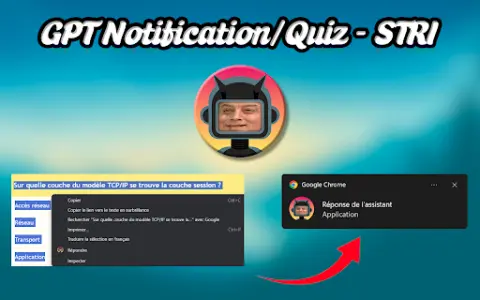
Introduction
An AI-powered extension for quick and accurate question answering.
What is an AI Assistant Extension, namely the Chrome extension/plug-in for AI Assistant?
This extension was initially created by students to help answer various surveys quickly. Through interactive pop-ups, it uses your API key and the selected AI model to provide accurate and timely responses, functioning as a real-time intelligent assistant tool.
How to use the AI Assistant Extension for Chrome? How to install and use this add-on/plug-in?
To install the extension, right-click on its icon and select “Options” to enter your API key and choose the AI model you wish to use for configuration. When using it, select the text of the question, right-click on it, and then choose “Answer”. Make sure that notifications are enabled so that you can receive real-time alerts. You can also customize settings in the Options section, such as the visual theme.
The core functionality of the AI Assistant extension for Chrome.
Interactive pop-up window
Model customization
Visual theme
API key integration
Related
New Super McGee
An open-source, enterprise-level AI agent collaboration platform
The new Parrot
An open-source, free local meeting note-taking tool for Mac.
New Nueve
Automatically convert photos of restaurant dishes into short videos and post them on social media platforms.
New Harness
A command center for the unified coordination of multiple AI agents
New Lancetta
Codex and Claude Code: Your Personal Quota Management Tools
新TimelinesAI WhatsApp MCP
WhatsApp Integrates MCP for AI Agents