AI TOOL / #04197
Text Selected
An extension for selecting text and retrieving relevant answers from a remote JSON file.
Introduction
Extension for selecting text and getting relevant answers from a remote JSON file.
What is the Text Selection Extension AI Chrome extension/plugin?
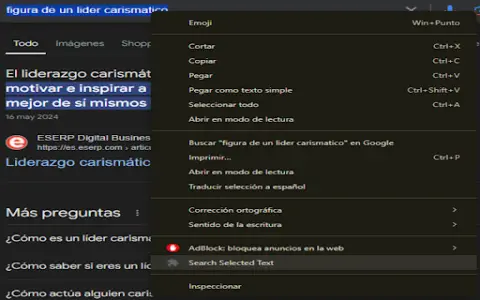
This extension allows users to select text on a webpage and quickly and efficiently get relevant answers. When you select text and use the extension’s context menu option, the selected text is sent to a remote service, which searches for the corresponding answer in a JSON file hosted on Google Cloud Storage. The answer is then displayed as an alert, providing you with additional information about the selected text. This is a useful tool for getting data and answers while browsing the web.
How do I use the Text Selection Extension AI Chrome extension/plugin?
Select text on a webpage and use the extension’s context menu option; the answer will be displayed in an alert.
Core features of the Text Selection Extension AI Chrome extension/plugin
Text selection and answer retrieval
Context menu integration
Remote JSON data source
Alert-based answer display
Related
Undetectio
AI rewriting tools enable AI-generated content to evade detection by AI-based systems.
CleverSpinner – AI Humanizer & Paraphrasing Tool
AI article rewriting tools, rotation tools, and user-friendly features are designed to generate unique and high-quality content.
Rewritify: Undetectable AI Rewriter
Rewritify AI makes AI-generated content more human-like, enabling it to bypass AI detection systems and prevent plagiarism.
EC Solver: Auto Recognition and Bypass
A browser extension that can automatically solve CAPTCHAs on any webpage.
hektCaptcha: hCaptcha Solver
Browser extensions that use AI to automatically solve hCaptcha challenges.
HideMyAI
Humanized tools for AI content generation help prevent the text produced by AI from being detected by AI detectors.