AI TOOL / #05085
QuantTalk
QuantTalk: Use natural language to create and optimize quantitative investment strategies.
Introduction
QuantTalk: Create and backtest quantitative investment strategies using natural language.
What is the QuantTalk AI Chrome extension/plug-in?
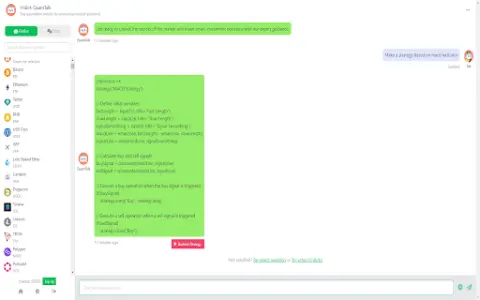
QuantTalk is a powerful investment tool that enables investors to easily create quantitative strategies using natural language. It automatically performs backtesting on TradingView and provides the results for review. In addition, it allows users to generate professional indicator charts through natural language input, giving everyone the opportunity to become an expert in quantitative analysis.
How to use the QuantTalk AI Chrome extension/plug-in?
Describe the investment strategy you wish to implement using natural language. QuantTalk will automatically perform backtesting on TradingView and provide the results. You can also use natural language to create custom indicator charts.
The core functions of the QuantTalk AI Chrome extension/plug-in
Creation of Natural Language Strategies
Automated backtesting on TradingView
Creation of professional indicator charts
Related
Frontline-style COD combat matches
Call of Duty-style shooting within a browser environment
Pogo Riot: a shooting game with bouncing sticks
In this multi-player FPS game, you need to jump while using the jumping stick and aim at your targets simultaneously.
Stop it already, kitty—stop pushing things around!
At three in the morning, a cat uses its claws to push things off the table without being able to wake its owner up; a single HTML file—no use at all when compared to a 3D model.
Hoppy Meadow: The Dancing Grassland
It seems like it’s just a regular platform jumping motion; the reversal only occurs after reaching the flagpole.
Handful: The God of Islands
You act as a god and help these little ones find the light.
The “Claude App” webpage inside the Blender room
Use a single command to create an entire room and render it in 4K quality; the link refers to the web page that mimics the interface of the Claude App, and it is displayed on the laptop screen.