AI TOOL / #05433
OpenAI expenses checker
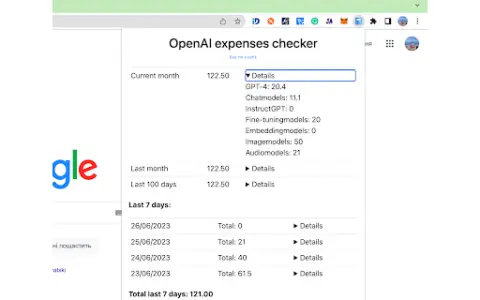
A Chrome extension that allows you to quickly check your OpenAI fees in your browser.
Introduction
Chrome extension for quickly checking OpenAI expenses directly in your browser.
What is the OpenAI Expenses Checker Chrome extension/plug-in?
The “OpenAI Fee Checker” Chrome extension offers a faster and more convenient way to keep track of your OpenAI costs. With this extension, you can directly access the fee-tracking functionality within your browser, saving time and eliminating the need to visit a separate website. It features a user-friendly interface that seamlessly integrates with your browser, and provides real-time updates and notifications, making cost management much simpler and more efficient.
How to use the OpenAI Expenses Checker Chrome extension/plug-in?
Install the “OpenAI Fee Checker” Chrome extension from the Chrome Web Store. Once installed, you will be able to check your OpenAI fees directly within your browser, without having to visit a separate website.
The core functionality of the OpenAI Expenses Checker AI Chrome extension/plug-in
Directly track expenses within the Chrome browser.
A simplified interface that facilitates quick and easy access.
Real-time updates and notifications
Related
AiAsk Summary
A Chrome extension tool that extracts article outlines to improve reading and research efficiency.
Nuggetize
An AI extension used for summarizing the content of videos, news articles, and web pages.
Rocky AI
AI tool extensions enable easy interaction with web content.
Bookly
An artificial intelligence-driven bookmark manager that offers automatic summary generation and search capabilities.
Page summary
Chrome extension for summarizing web pages using ChatGPT.
GOAT AI
GOAT AI offers one-click AI summaries that are suitable for a wide range of content types, thereby enhancing users’ ability to understand the information.