AI TOOL / #05985
Voiceboost – ChatGPT
A Chrome extension designed for voice-controlled interaction with ChatGPT.
Introduction
Chrome extension for voice-controlled ChatGPT interaction.
What is the Voiceboost AI Chrome extension/plug-in?
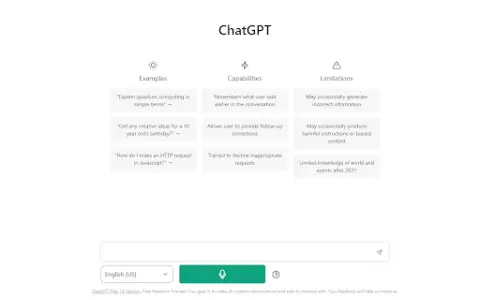
Voiceboost is a Chrome extension that allows users to interact with ChatGPT via voice commands. It adds a button below the input field; by clicking this button, the system captures the user’s verbal inquiries and sends them to ChatGPT for responses. This provides a hands-free alternative for entering text.
How to use the Voiceboost AI Chrome extension/plug-in?
Click the button added below the input area to start recording your voice input. Alternatively, use the keyboard shortcuts: Ctrl+Shift+S (Windows) or Command+Shift+S (Mac) to begin recording, and Ctrl+Shift+E (Windows) or Command+Shift+E (Mac) to stop and submit the recording. Make sure to grant microphone access when prompted.
The core functionality of the Voiceboost AI Chrome extension/plugin
Voice input for ChatGPT
Keyboard shortcuts for voice capture and submission
Related
Send To RoomDeco
An AI-powered platform for transforming interior design styles
Shnap – Visual Search for Fashion
Instantly purchase fashionable products by simply taking photos.
Outfit.fm
Outfit.fm is an online virtual fitting room platform that allows users to instantly try on any garment with the help of artificial intelligence.
Image Editor AI
ImageEditor.AI is an AI-assisted tool that uses advanced algorithms for online image editing. It edits or creates images based on the user's instructions. All users need to do is tell the AI what changes they want to make to the image, or request the creation of a completely new image.
Clueso
An AI-powered video editor that helps marketing teams create product videos and documentation quickly.
SkyFrom.earth
SkyFrom creates custom star map posters based on any date, time, and location.