AI TOOL / #06524
Speak based on Azure Speech
Text-to-speech extension using Azure Speech with support for multiple languages and Chrome live subtitles.
Introduction
Text-to-speech extension using Azure Speech, supports many languages and Chrome Live Caption.
What is Azure Speech TTS Extension ai chrome extension/plugin?
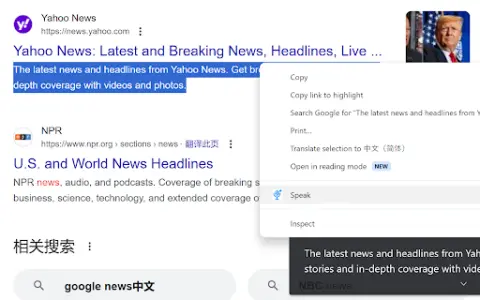
This is a text-to-speech (TTS) extension that leverages the Azure Speech service to convert selected text to audio. It supports multiple languages and integrates with Chrome's Live Subtitles feature for enhanced accessibility. Users need to configure the extension using their Azure Speech Service API key to enable TTS functionality.
How to use Azure Speech TTS Extension ai chrome extension/plugin?
Install the extension, configure it with your Azure Speech Service API key, select text on a web page, and use the extension to play audio for the selected text. Audio playback will be based on the selected language and voice settings.
Core features of Azure Speech TTS Extension ai chrome extension/plugin
Text-to-speech using Azure Speech Service
Support multiple languages
Integrate with Chrome Live Subtitles
Configurable voice settings
Related
Incredible
A computer-based intelligent agent that can help you find work to do.
Impractical
Using conversations to create product animation videos
Manufact
MCP Application Hosting and Listing Verification
Storiara
The budget and schedule will be determined 20 minutes after the script is uploaded.
DJ.Studio
在时间线上排混音的 DJ 软件
telo
苹果健康数据接入ChatGPT