AI TOOL / #06527
Wavenet for Chrome
An extension to convert selected text into natural audio using Google Cloud TTS.
Introduction
TTS extension using Google Cloud TTS for natural audio from highlighted text.
What is TTS Extension ai chrome extension/plugin?
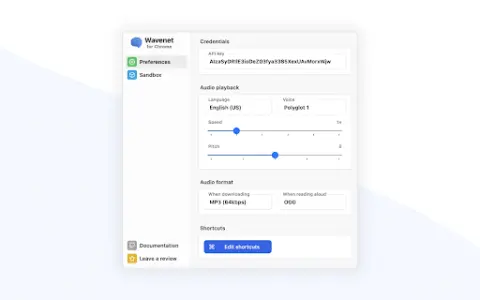
This is a text-to-speech (TTS) extension that converts selected text into high-quality natural-sounding audio, using Google Cloud's Text-to-Speech. You need to create your own API key to use this extension. It supports all Google WaveNet, Neural2, News, Studio voices and languages. It also allows adjusting pitch and speed, and downloading selected text as MP3 files. Supports SSML. It chunks selected text into sentences to bypass the 5000 character limit and reduce usage costs.
How to use TTS Extension ai chrome extension/plugin?
1. Create a Google Cloud API key. 2. Select the text you want to convert. 3. Use extensions to convert text to speech. 4. Adjust pitch and tempo as needed. 5. If necessary, you can download it as an MP3 file. Use Cmd+Shift+S on macOS or Ctrl+Shift+S on Windows to speak text. Use Cmd+Shift+E on macOS or Ctrl+Shift+E on Windows to download selected text.
TTS Extension ai chrome extension/plug-in core functions
Text-to-speech using Google Cloud TTS
Supports Google WaveNet, Neural2, News and Studio voices and multiple languages
Adjustable pitch and speed
MP3 download
Support SSML
Chunk sentences to get around character limits
Related
Dippr
Data platform for intelligent agents
Every Signal
One-hour due diligence on the company providing the information
Volcano
The application cloud platform prepared for programming intelligent agents
Scrapely
A data platform whose APIs can be called as needed by existing crawlers.
EverXCloud
按小时租 GPU 的算力交易市场
Memanto
专门替其他智能体管记忆的智能体