AI TOOL / #07462
Vision AI
A Chrome extension that enables AI-driven insights based on screenshot data.
Introduction
Chrome extension for AI-powered insights from screenshots.
What is a Vision AI Chrome extension/plug-in?
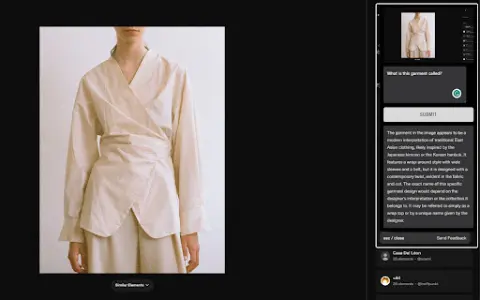
Visual AI is a Chrome extension that combines screenshot functionality with AI-driven insights to enhance online information search. It allows users to capture any portion of a web page, add notes or questions, and receive AI-generated responses based on the context of the captured image.
How to use the Vision AI Chrome extension/plug-in?
Install the Visual AI Chrome extension. Use CTRL + SHIFT + Y to take a screenshot, and then add any notes or questions you have. Visual AI will analyze the screenshot and provide an AI-generated response.
The core functions of the Vision AI Chrome extension/plugin
Screenshot capture
Interactive AI Suggestions
Seamless browser integration
Suitable for a wide range of applications in various fields
Privacy and Security
Related
EOSI Finance
A Web3 platform for copying AI-assisted professional traders.
TaxGenius
AI-based tax applications make it easier to answer tax-related questions.
Chicago Bull AI
An artificial intelligence chatbot designed for real-time processing of stock market data, financial information, news, and various filtering functions.
RunStocks
RunStocks analyzes historical data of small-cap stocks to assist intraday traders in making informed decisions.
Mindelia
An AI-powered platform that connects homeowners with professionals in the home renovation industry and helps generate potential clients.
Remodeled AI
AI-based platform for instant home renovation visualization and design.