AI TOOL / #08846
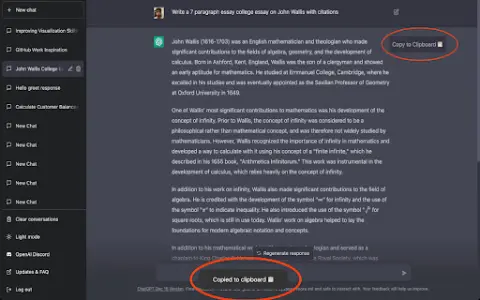
Copy for Chat GPT
An extension used to copy ChatGPT responses and check for plagiarism.
Introduction
Extension to copy ChatGPT responses and check for plagiarism.
What is the Plagiarism Detector Extension for Chrome – an extension/plug-in for Google Chrome?
This extension allows you to copy the responses generated by ChatGPT by clicking a button or using the CMD+K shortcut key, and then have those responses checked by plagiarism detection tools.
How to use the Plagiarism Detector Extension for Chrome?
You can use this extension by clicking the copy button on ChatGPT’s response or by pressing CMD+K. The copied text will be automatically checked to determine whether it contains any plagiarized content.
The core functionality of the Plagiarism Detector Extension for Chrome.
One-click to copy the response from ChatGPT
Use the CMD+K shortcut key to copy.
Automatic plagiarism detection
Related
FluentWork AI
Voice control and assistance features specifically designed for Google Meet meetings.
amy
An enterprise collaboration platform that uses AI-driven tools, designed to enhance team management and productivity.
waveup.io software.
Provide technical solutions for the catering industry to simplify operations and enhance the customer experience.
Salient
An artificial intelligence-based loan service platform designed for the consumer finance sector, which enables automated interactions and ensures compliance with regulatory requirements.
Smoove Call
An AI voice agent platform for corporate communications, lead generation, and automation.
NaviVoice: Voice Input Productivity Assistant
Voice-activated assistant that enables hands-free computer control and web browsing.