AI TOOL / #03842
TabJam for ChatGPT
A ChatGPT plugin that allows web content to be integrated into conversations.
Introduction
A ChatGPT add-on for integrating web page content into conversations.
What is the TabJam AI Chrome extension/plug-in?
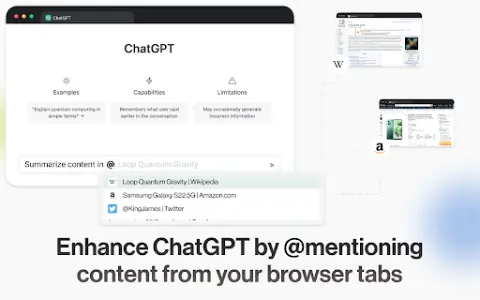
TabJam is a free third-party plugin for ChatGPT that offers users new functionality, enabling them to easily integrate web page content into their conversations with ChatGPT. It allows users to @mention open tabs in their browsers within ChatGPT messages in order to extract relevant content, or it enables them to start a new conversation related to the contents of a specific web page by using simple shortcut keys.
How to use the TabJam AI Chrome extension/plug-in?
In ChatGPT, there are two ways to use TabJam: one is by using tags initiated through @mentions, and the other is by using shortcut keys ([Cmd ⌘]+J or [Ctrl]+M) while viewing a web page to start a new conversation and obtain the content of that page.
The core functions of the TabJam Chrome extension/plugin
Integrate the content of the opened browser tab into the ChatGPT conversation.
Use a shortcut key to start a new chat session regarding the content of the web page.
@Use the mention tag to include the relevant content in your ChatGPT messages.
Related
Apodex
Traceable deep study solver
Kimi Code
AI programming CLI equipped with K3
DeepSkill
Agent Skill Discovery and Installation
Tencent Lingya
Tencent AIGC Creator Community
PixPix Prompt Dictionary
Free collection of text prompt words
DoLabAI
Generation of AI-powered e-commerce product promotion videos