AI TOOL / #04197
Text Selected
An extension for selecting text and retrieving relevant answers from a remote JSON file.
Introduction
Extension for selecting text and getting relevant answers from a remote JSON file.
What is the Text Selection Extension AI Chrome extension/plugin?
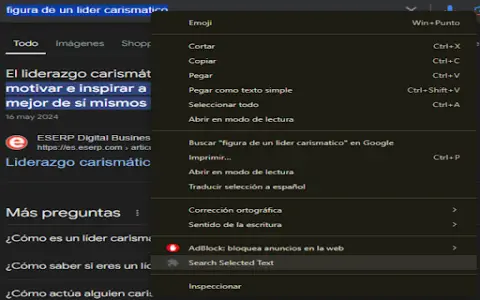
This extension allows users to select text on a webpage and quickly and efficiently get relevant answers. When you select text and use the extension’s context menu option, the selected text is sent to a remote service, which searches for the corresponding answer in a JSON file hosted on Google Cloud Storage. The answer is then displayed as an alert, providing you with additional information about the selected text. This is a useful tool for getting data and answers while browsing the web.
How do I use the Text Selection Extension AI Chrome extension/plugin?
Select text on a webpage and use the extension’s context menu option; the answer will be displayed in an alert.
Core features of the Text Selection Extension AI Chrome extension/plugin
Text selection and answer retrieval
Context menu integration
Remote JSON data source
Alert-based answer display
Related
Offthreadr AI
An artificial intelligence-powered learning platform enhances the effectiveness of learning by providing concise study summaries and Q&A sections related to course content.
ProApp: Learn Design the AI Way
An affordable design learning platform that offers AI-powered tutoring, courses, workshops, and challenges.
Theoriestudio
Theoriestudio is a platform that utilizes artificial intelligence to assist in the learning of driving theory, offering courses, quizzes, and simulated exams.
Candide
An educational technology platform that enables children to learn about AI through online courses and thus unleash their creativity.
Parlay
Parlay is a customizable AI learning app with personalized paths and progress tracking.
101.school
An AI-based platform designed to create and offer multi-week online courses.