AI TOOL / #05085
QuantTalk
QuantTalk: Use natural language to create and optimize quantitative investment strategies.
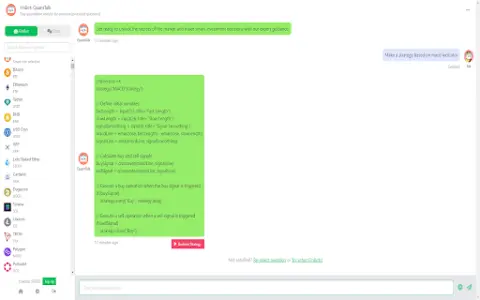
Introduction
QuantTalk: Create and backtest quantitative investment strategies using natural language.
What is the QuantTalk AI Chrome extension/plug-in?
QuantTalk is a powerful investment tool that enables investors to easily create quantitative strategies using natural language. It automatically performs backtesting on TradingView and provides the results for review. In addition, it allows users to generate professional indicator charts through natural language input, giving everyone the opportunity to become an expert in quantitative analysis.
How to use the QuantTalk AI Chrome extension/plug-in?
Describe the investment strategy you wish to implement using natural language. QuantTalk will automatically perform backtesting on TradingView and provide the results. You can also use natural language to create custom indicator charts.
The core functions of the QuantTalk AI Chrome extension/plug-in
Creation of Natural Language Strategies
Automated backtesting on TradingView
Creation of professional indicator charts
Related
CoinGPT
A free app that identifies and appraises coins, stamps, banknotes, and antiques from photos.
stylitics.com
AI-powered platforms that offer inspiring business experiences.
ScreenScan – Instant Screenshot Search
Google Lens: Instantly capture, search, and explore images, videos, and text online.
Aligifts
Connecting buyers with the global online retail market, which is primarily based in China.
piXme
piXme is an intelligent photo cloud service designed to efficiently manage, organize and share photos, leveraging artificial intelligence technology.
Green Card & Visa Photo Maker
Tools for editing passport photos, adjusting their dimensions, and removing backgrounds, specifically designed for use with official documents.