AI TOOL / #06136
Ask Screenshot for Gemini
Improve productivity by integrating screenshot and text analysis with Gemini.
Introduction
Enhances productivity by integrating screenshot and text analysis with Gemini.
What is the Ask Screenshot AI Chrome extension/plug-in?
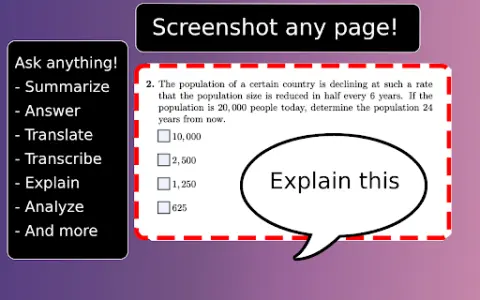
Ask Screenshot is a tool designed to enhance productivity by directly integrating screenshot and text selection analysis with Gemini. It enables users to quickly capture screenshots or select text, and then use Gemini to perform tasks such as summarizing, transcribing, interpreting, translating, or carrying out other operations based on predefined or customizable templates.
How to use the Ask Screenshot AI Chrome extension/plug-in?
To use “Ask Screenshot”, simply right-click on any page and hover over “Ask Gemini” to access the available screenshot templates. For selecting text, right-click on the desired text and hover over “Ask Gemini” to view the available templates.
Explore the core features of the Screenshot AI Chrome extension/plug-in.
Take a screenshot and perform analysis: After capturing the screenshot, Gemini will automatically be used to conduct the analysis.
Select and analyze text: Right-click on any selected text to automatically have Gemini perform the analysis.
Related
Maxworker
AI colleagues living in Slack
TalkPix AI
A single photograph can be used to create a video that is capable of “speaking”.
Supademo AI Demo Agent
An interactive product demonstration that provides answers to users' questions
Velozity
A virtual office where teams work alongside AI intelligent agents
Ownfeed
Every day, help you identify the posts that require your products.
StudyQuest
An AI learning tool that turns study notes into fun, level-based mini-games