AI TOOL / #06171
Patsa – AI-powered Meeting Copilot
A Chrome extension that enables real-time transcription and AI-powered Q&A during online meetings.
Introduction
Chrome extension for real-time transcription and AI-powered Q&A during online meetings.
What is the Patsa AI Chrome extension/plugin?
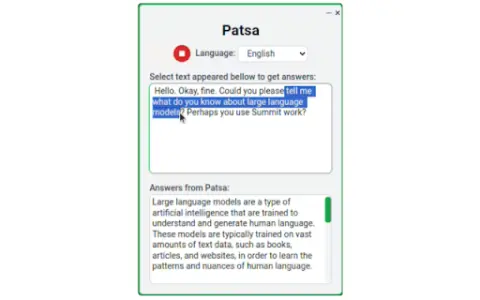
Patsa is a Chrome browser extension designed to enhance online meetings on platforms such as Google Meet, Zoom, and Teams. It transcribes other participants’ speech in real time and lets users select transcribed text to ask AI questions, providing instant information and answers.
How do I use the Patsa AI Chrome extension/plugin?
1) Launch the Patsa extension in any online meeting in Chrome. 2) Click the "Start Transcribing" button to transcribe what the other participants are saying. 3) Select the transcript text you want to ask the AI about, and you'll receive an instant response from the AI.
Core features of the Patsa AI Chrome extension/plugin
Real-time transcription of participants’ speech
AI Q&A based on transcribed text
Related
Zeli
Zeli provides summaries of articles from Hacker News and HuggingFace, offering concise summaries to help users quickly locate content that interests them.
Koffy
An encrypted news aggregator that provides AI-powered summaries and market analyses.
PANORA News App
Artificial intelligence-powered news applications help combat fake information and provide features for summarizing content as well as detecting biases.
AskNews
AskNews: Provides unbiased news through both human editing and artificial intelligence, and also offers APIs dedicated to LLMs.
JustAINews
A digital media platform offering the latest AI news, technology, and applications.
Golden Record
A platform to preserve and share your loved ones’ stories and memories through audio recording.