AI TOOL / #06243
Instant Multilingual PDF/HTML/TXT Dictionary
An extension that makes it easy to obtain definitions and pronunciations of words.
Introduction
An extension for easy word definitions and pronunciation.
What is a Definition Extension for Chrome – an extension or plugin?
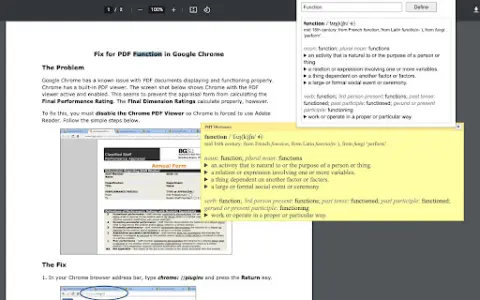
This extension enhances your reading experience by providing easy access to the definition of words and phrases. Simply select a word or phrase, and then use Alt+Shift+Z (except for local PDF files) or right-click to define it. You can customize shortcut keys, choose from various definition providers (including ChatGPT), and personalize the pop-up window that appears. Additionally, it offers links for web searches and allows you to back up your definitions using ChatGPT. A special feature enables you to hear the pronunciation of words on pages protected by Content Security Policies.
How to use the Definition Extension for Chrome?
Install the extension. Select a word or phrase. Use Alt+Shift+Z (except for local PDF files), or right-click and choose “Define [the word you have selected]”. Customize the settings using the extension options.
The core functionality of the Definition Extension for Chrome: an extension/plugin designed to enhance the functionality of Google Chrome.
Search for word definitions by making selections or using shortcut keys/right-click options.
It allows for the customization of shortcut keys as well as the definition of providers.
Integrate ChatGPT for definition and language support purposes.
Pop-up window settings
Web search links used to expand information
The pronunciation of the CSP page for a specific website
Related
Photes.io
The AI note-taking assistant is capable of converting photos, PDF files, audio recordings, and videos into organized text notes.
Disto
A Chrome extension that uses AI-powered object detection and search functionality to enable shopping from images.
Auto background remover by object recognition
An AI tool that automatically removes backgrounds from images, producing transparent PNG files as results.
GIZO- Safe Driving Global Challenge
Video remote information processing based on artificial intelligence contributes to safer and more sustainable modes of transportation.
Robovision.ai
A visual AI platform for industrial automation, covering the complete AI lifecycle.
PhobiaBlocker
Browser extension that uses machine learning to block fear-inducing images.