AI TOOL / #07004
Getaudify
An AI Chrome extension designed for summarizing text, converting text to speech, providing answer-based services, and performing content analysis.
Introduction
AI Chrome extension for summarizing, text-to-voice, Q&A, and content analysis.
What is GetAudify?
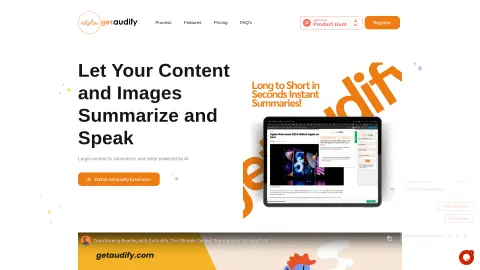
GetAudify is a powerful AI-powered Chrome extension designed to enhance the productivity and information-handling capabilities of professionals, students, and enthusiasts. It offers features such as text summarization, text-to-speech conversion, the ability to generate questions from text and images, code analysis, and image recognition. The platform also includes a dashboard for managing credits, API keys, and viewing usage history. Its purpose is to help users summarize large amounts of content, convert images into text, generate questions, and take advantage of multi-language support as well as customizable tone settings.
How to use GetAudify?
To use GetAudify, first create a free account to obtain 20 free credits, and then generate an API key from the dashboard. Next, download the GetAudify Chrome extension and log in using your API key. To summarize text or convert it into audio, right-click on the selected text or image on the web page and choose the GetAudify option. For images, a pop-up window will appear offering options such as only summarizing the content or summarizing it along with generating audio. If you want to ask questions about the text or image, select the relevant content, right-click, choose GetAudify, and then select “Ask a Question” to open a new field for entering your query. The dashboard can be accessed using an email address and password, allowing you to manage your credits, settings, and API key.
The core functions of GetAudify
AI-based text summarization
Text-to-speech functionality (including narration) is available in both male and female voices. Users can customize the tone of the audio as well as select different languages for playback.
Q&A functions for text and images
Image analysis (extracting summaries from images, converting images into text)
Code analysis
Dashboards for integration management, API key generation, and tracking of usage history
Real-time summarization and speech generation
Related
Snipaste
Snipaste is a simple yet powerful screenshot tool that also supports the ability to paste images directly onto the screen. This makes it much more convenient for you to view the captured images, thereby significantly improving your work efficiency. Download and open Snipaste, press F1 to start taking a screenshot, and then press F3 to save it.
VirSCAN
VirSCAN & VirSCAN.org is a non-profit, free website dedicated to serving internet users. It uses the latest virus detection engines provided by various manufacturers to scan suspicious files that you upload online, and it can immediately display the results of these scans.
Front-end learning roadmap
Front-end Roadmap This is a website that helps novice, junior, and intermediate front-end developers continue to improve. Teach you step by step how to learn front-end development from scratch and learn all the detailed processes of front-end development. At every stage and every step, there will be detailed learning materials. What you have to do is based on this
absurd news
“Shadao News” is a website dedicated to sharing humorous news stories. It claims: “We don’t create jokes ourselves; we’re just mere distributors of news.” The site consists of four sections: “Shadao Celebrity News,” “International Highlights,” “Shadao Videos,” and “Shadao Pictures.” It gathers funny and bizarre news from various sources, and each article includes a link to the original source where the content was posted.
This person does not exist.
This site is no longer active. At 02:03:36 on March 28, 2023, “thispersondoesnotexist” indicated that this individual does not actually exist. Every time the website is refreshed, a new portrait image of this fictional character is generated. This character does not exist in reality; he was created using a generative adversarial network.
find hidden cow
Find the hidden cow: findtheinvisiblecow A very interesting website, move your mouse over the blank page to find the hidden cow. The closer your mouse is to the cow, the louder the cow's cry will be. If you find five cows in total, you can also unlock the next animal~~The sound of cows is very funny