AI TOOL / #08846
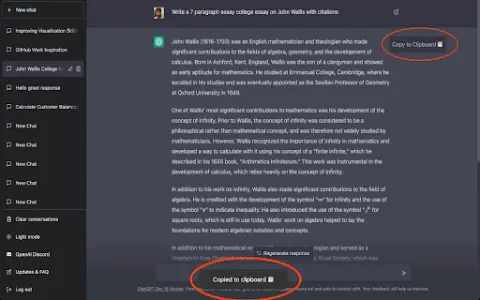
Copy for Chat GPT
An extension used to copy ChatGPT responses and check for plagiarism.
Introduction
Extension to copy ChatGPT responses and check for plagiarism.
What is the Plagiarism Detector Extension for Chrome – an extension/plug-in for Google Chrome?
This extension allows you to copy the responses generated by ChatGPT by clicking a button or using the CMD+K shortcut key, and then have those responses checked by plagiarism detection tools.
How to use the Plagiarism Detector Extension for Chrome?
You can use this extension by clicking the copy button on ChatGPT’s response or by pressing CMD+K. The copied text will be automatically checked to determine whether it contains any plagiarized content.
The core functionality of the Plagiarism Detector Extension for Chrome.
One-click to copy the response from ChatGPT
Use the CMD+K shortcut key to copy.
Automatic plagiarism detection
Related
Fireflies.ai
The AI conference assistant is capable of recording, transcribing, and summarizing meetings held on multiple platforms.
UnleashX
Cross-departmental enterprise AI employee platform
ShareOne
Sharing and word-highlighting feedback for pages generated by AI
Qovest
The AI research and investment assistant launched by Alibaba Cloud
Glasshand
Renting real iPhones and Macs for AI agents
DocsAlot
A managed document platform that can be read by both humans and AI systems