AI TOOL / #00924
Halo
A handy utility for converting the notch on your Mac into a “Dynamic Island” interface
Introduction
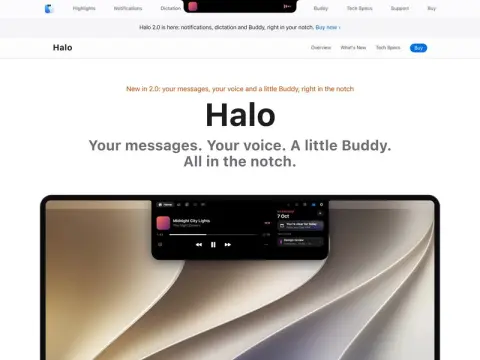
In a nutshell: Add a “Dynamic Island” to the notch on Mac devices. For models without notches or those using external screens, simply draw a line at the top or side of the screen. The functions that can be incorporated through this design include:
- Notice: The notification banners for applications such as Messages, Slack, Mail, and Telegram will now appear within the interface. You can enable or disable these notifications for each application individually, but you will need to have the necessary accessibility permissions enabled.
- Dictation: Hold down the Fn key (or Right Option/Right Command key) while speaking, and the text will be directly inserted at the cursor position. By default, Apple’s voice recognition technology is used; you can also use your own Groq account to enable Whisper mode, which supports eight different languages.
- AI Agent Dashboard: This dashboard shows whether the Claude Code or Codex sessions are currently active, waiting for your authorization, have been completed, or are experiencing issues. The amount of usage is indicated by circles, and next to each indicator, there is a small icon whose expression changes depending on the status of the corresponding agent, as the cursor moves across the dashboard.
- Miscellaneous: Currently playing, volume and brightness controls, file temporary storage interface, timer; on Apple chip-based devices, it is also possible to adjust the brightness of external monitors and select the input source.
It requires macOS 15 or later. The product can be purchased for a one-time fee of $9.99, and one license allows installation on up to 3 Mac devices. Currently, this product has not been officially certified by Apple; therefore, when you first use it, you need to manually enable it in the Privacy & Security settings of your system.
Related
Marco Pineapple
Marco Pineapple — Marco Pineapple macbl is a website focused on Mac app downloads and a must-visit for Mac users. The site is clean and ad-free; no registration or login is required, and all Mac apps can be downloaded directly for free! Every app author provides a detailed introduction.
Focus on Win10.
“Focus on Win10” is an optimized version of Windows 10 developed by the author of “Kiss Your Wife”. It is based on the latest official version of Windows 10 and has been carefully streamlined, optimized, and enhanced to make the Windows 10 system more user-friendly. The author offers two different versions of this optimization package for Windows 10.
Thanh To
Clear Images is an online tool that makes blurry images clear based on deep learning techniques. The operation is relatively simple, the processing speed is fast, and there are functions such as matting, ID photo, text dubbing, etc. (Tools start charging, check in every day to get free watermark-free processing times) "Clear Map" is based on leading deep learning technology
Himalaya Member
Himalaya Member Discount Purchase Campaign: Himalaya 423 Audiobook Festival. Event period: April 15, 2022 – April 21, 2022. Event location: http://xima.tv/1_Fc47Kt?_sonic=0. Members of Himalaya's joint membership program can take advantage of this offer.
Processor Rankings
Mobile Chip Performance Rankings. This website is proudly produced by Geekerwan. The rankings give you a clear, intuitive look at the current performance of mobile processors and can serve as a useful reference when buying a phone. The site lists an overall performance ranking, CPU...
iconfont
An officially developed vector icon management and communication platform by Alibaba. Designers can upload their icons to the iconfont platform, where users can download icons in various formats as needed. The platform also allows icons to be converted into fonts, making it convenient for front-end developers to adjust and use these icons freely. Currently, the platform contains a total of 18,600 icons.